



Understanding On-Premise vs.Cloud Infrastructure
The debate between on-premise and cloud infrastructure is more than justamatter of technology—it’s about aligning IT strategy with business vision. On-premise infrastructure places all hardware, software, and data withinyourorganization’s physical walls. This model offers granular control, customization,and a sense of security that’s especially valued in industries with strictcompliance needs or sensitive data. However, it also demands significant upfrontcapital, ongoing maintenance, and a skilled IT team to manage everythingfromupdates to disaster recovery.
Cloud infrastructure, in contrast, shifts the paradigm. Here, resources are hostedoff-site by third-party providers and delivered over the internet. The cloud’s allure lies in its agility: you can scale resources up or down in real time, pay onlyforwhat you use, and offload the heavy lifting of maintenance and upgrades to yourprovider. This flexibility is a game-changer for organizations seekingrapidinnovation or supporting a distributed workforce.
Key Business Drivers for On Premise to Cloud Migration
The decision to migrate from on-premise to cloud infrastructure is rarelyabouttechnology alone—it’s driven by strategic imperatives that shape the future of thebusiness.
● Agility: In today’s volatile markets, organizations need the ability topivotquickly, launch new services, and respond to customer demands without theconstraints of legacy systems. Cloud platforms empower teams to innovatefaster, experiment safely, and scale successful initiatives with ease.
● Cost Optimization: Maintaining on-premise infrastructure oftenmeansgrappling with high capital expenditures, unpredictable maintenance costs,and the burden of hardware refresh cycles. Cloud migration shifts spendingto a more predictable, pay-as-you-go model, freeing up capital for strategicinvestments and reducing the total cost of ownership over time.
● Security and Compliance: Modern cloud providers invest heavily in robustsecurity frameworks, continuous monitoring, and compliance certifications,often surpassing what is feasible for individual organizations to achieve in-house. This allows businesses to strengthen their security posturewhilefocusing internal resources on core competencies.
● Digital transformation: Cloud migration is the catalyst for adoptingadvanced analytics, AI, and automation—unlocking new businessmodelsand delivering exceptional customer experiences. The organizations leading their industries today are those who see cloud not just as an IT upgrade, butas a strategic enabler for growth and resilience.
Choosing the Right Cloud Model: Public, Private, Hybrid, or Community Cloud
Selecting the right cloud model is a pivotal decision that shapesyourorganization’s agility, security, and future innovation. Each model—public,private, hybrid, and multi-cloud—offers distinct advantages, and the best fitdepends on your unique business needs and regulatory landscape.
● Public cloud: It is the go-to for organizations seeking rapid scalability,global reach, and cost efficiency. With resources delivered over the internetby providers like AWS, Azure, or Google Cloud, you gain access to cutting-edge technologies without the burden of maintaining physical infrastructure.This model is ideal for dynamic workloads and businesses prioritizing speedto market.
● Private cloud: It delivers dedicated resources—either on-premise or hostedby a third party. It’s the model of choice for industries with strictcompliancerequirements or sensitive data, offering greater control, customization,andisolation. While it often involves higher upfront investment, the payoff comesin the form of tailored security and performance.
● Hybrid cloud: It blends the best of both worlds, allowing organizations tokeep mission-critical workloads on-premise or in a private cloudwhileleveraging the public cloud for elasticity and innovation. This flexibilitysupports gradual migration and optimized resource allocation.
● Community cloud: It takes diversification further, distributingworkloadsacross multiple public cloud providers. This approach minimizesvendorlock-in, enhances resilience, and enables businesses to cherry-pick best-in-class services. The right cloud model isn’t one-size-fits-all—it’s a strategicchoice that should evolve alongside your business priorities and growthambitions.

Essential On-Premise to Cloud Migration Tools for ModernEnterprises
Today’s enterprises need more than just a tool—they need a migration partnerthat offers visibility, automation, and security every step of the way. Thelandscape is rich with options, each tailored to different business needsandcloud destinations.
● Microsoft Azure: For organizations migrating to Microsoft Azure, AzureMigrate stands out as a central hub, offering everything from discoveryanddependency mapping to cost estimation and compatibility analysis.Itsagentless and agent-based migration options, combined withacomprehensive dashboard, help teams orchestrate complex migrations withconfidence.
● Google Cloud: Google Cloud Migration Center provides tailored strategies,batch migration support, and ongoing monitoring, ensuring workloads moveseamlessly and performance is validated post-migration.
● AWS Data Migration Services (DMS): It excells at large-scale migrationswith resource consolidation and full server migration capabilities. Ultimately, the best migration tool is one that aligns with your ITlandscape,security requirements, and growth ambitions—empowering your enterprise tounlock the full value of the cloud.
The 7 Rs Framework: Selecting Your Migration Approach
The 7 Rs framework, now a cornerstone of cloud migration strategy,empowersorganizations to make informed, nuanced decisions that align with both technicalrealities and business priorities.
Let’s break down the 7 Rs:
● Rehost: Often called “lift and shift,” this approach moves applications to thecloud with minimal changes. It’s fast and low-risk, ideal for organizationsseeking quick wins or lacking cloud-native expertise.
● Relocate: This strategy migrates entire platforms or virtual environments(like VMware or Kubernetes) to the cloud without modifying applications. Itminimizes disruption and is suited for businesses with establishedvirtualization.
● Replatform: Here, you make a few optimizations during migration—think ofit as “lift, tinker, and shift.” This allows you to leverage some cloud benefitswithout a complete overhaul.
● Refactor: This is a deeper transformation, re-architecting applications tofully exploit cloud-native features. Refactoring is best for organizationsaiming for maximum agility and innovation, though it’s the most resource-intensive option.
● Repurchase: Sometimes, it’s more efficient to switch to a new, cloud-basedsolution—often a SaaS product—rather than migrate legacy systems.
● Retain: Not everything belongs in the cloud. Some workloads are best lefton-premise due to compliance, latency, or business reasons. Retainingselect applications ensures you’re not forcing a square peg into aroundhole.
● Retire: Finally, migration is an opportunity to decommission outdatedorredundant applications, streamlining your IT landscape and reducing costs.
The 7 Rs framework isn’t just a checklist—it’s a strategic lens for evaluating eachapplication’s future. By mapping workloads to the right migration strategy,youreduce risk, maximize value, and set your organization up for a seamless, future-ready cloud environment.
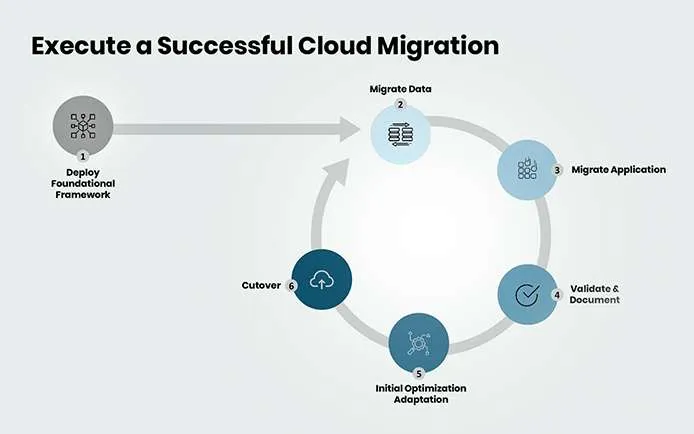
Designing Robust On-Premise to Cloud Migration Architecture
Step 1: Deploy Foundational Framework : Establish the core infrastructure and governance foundation before any migrationbegins. This involves setting up network connectivity, security controls, identityand access management, monitoring systems, and compliance frameworks. Deploy landing zones, configure VPNs or dedicated connections, and establishbaseline security policies that will support all future workloads.
Step 2: Migrate Data : Execute data migration as a priority, ensuring data integrity, security,andminimal downtime. Use appropriate data transfer methods—online transfers forsmaller datasets, offline methods for large volumes. Implement data validation, encryption in transit and at rest, and establish backup and recovery procedures.Test data accessibility and performance before proceeding to applicationmigration.
Step 3: Migrate Applications : Move applications systematically based on your chosen migration strategy(rehost, replatform, refactor, etc.). Start with less critical applications to validateprocesses and build confidence. Ensure application dependencies are properlymapped and that supporting services are available in the cloud environment.
Step 4: Validate & Document : Thoroughly test all migrated components to ensure functionality, performance,and security meet requirements. Conduct user acceptance testing, performancebenchmarking, and security validation. Document configurations, processes, andany issues encountered for future reference and compliance purposes.
Step 5: Initial Optimization/Adaptation : Fine-tune the cloud environment for optimal performance and cost efficiency.Right-size resources, implement auto-scaling, optimize storage configurations,and refine security settings. Address any performance gaps and begin leveragingcloud-native features for enhanced capabilities.
Step 6: Cutover : Execute the final transition from on-premise to cloud systems. This includes DNSchanges, traffic routing, decommissioning old systems, and ensuring allusersare accessing the new cloud environment. Maintain rollback capabilities until themigration is fully validated and stable.This cyclical approach ensures each phase is properly validated beforeproceeding, minimizing risk and maximizing the chances of a successful cloudmigration.
Source: https://schematickomplex261.z21.web.core.windows.net/cloud-migration-process-diagram.html
Overcoming Common Challenges in On Premise to CloudMigration
Cloud migration promises agility and innovation, but the journey from on-premiseto cloud is rarely without obstacles. The most successful organizationsdon’tignore these challenges—they anticipate and address them head-on.
● Legacy system: Many enterprises rely on deeply integrated, custom-builtapplications that aren’t cloud-ready. Untangling dependenciesandmodernizing code can be daunting, but a phased migration—prioritizing low-complexity workloads first—helps build momentum and confidence.
● Data security and compliance: Moving sensitive information offsite raises questions about privacy, regulatory requirements, and control. The solution lies in robust planning: encrypt data in transit and at rest, leverage the cloud provider’s compliance certifications, and establish clear governance policies from day one
● Downtime and business disruption: A poorly executed migration can lead to outages or lost productivity. To mitigate this, organizations should investin comprehensive testing, pilot migrations, and roll back plans . Communication across teams is crucial—everyone from IT to businesss take holders must be aligned on timelines and contingency measures.
● Cloud Skills Gaps: Upskilling internal teams or partnering with experienced cloud consultants accelerates adoption and reduces risk. By proactivelytackling these challenges, enterprises transform migration from aroad block into a springboard for digital transformation.
Conclusion
Migrating from on-premise to cloud is more than a technical upgrade—it’s astrategic leap that positions your organization for agility, innovation, and sustainable growth. By leveraging the right migration tools, crafting a detailed project plan, designing resilient cloud architectures, and following proven best practices, enterprises can navigate the complexities of transformation with confidence. At Cubastion, we empower businesses to unlock the full potential of the cloud, ensuring every migration is secure, seamless, and aligned with long term business goals. The journey may be complex, but with the right expertise and vision, on-premise to cloud migration becomes a catalyst for digital excellence and competitive advantage.