


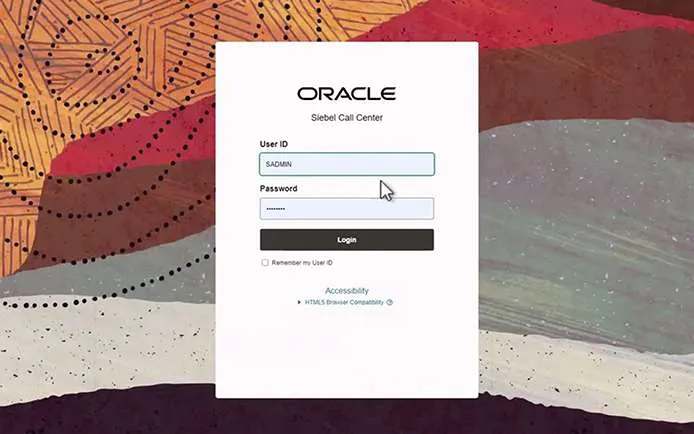

What is Oracle Redwood Theme?
The enterprise UI world is undergoing a makeover—and Oracle is leading the charge. The Redwood Theme, Oracle’s next-gen design system, reimagines how business users interact with applications like Siebel CRM, offering a cleaner, unified, and more intuitive experience. Think of it as Oracle’s visual and interaction makeover — moving away from dated, cluttered interfaces to clean, intuitive ones that users enjoy working with. This is not just about aesthetics—
Redwood reflects a shift in usability, productivity, and consistency across theOracle landscape.
Oracle introduced Redwood to solve a long-standing problem: inconsistencyacross its suite of apps. For users switching between products like FusionCloud,Siebel, or E-Business Suite, the user experience often felt disjointed.Redwoodbridges this gap by providing a unified look and feel, improving usability, reducingtraining time, and aligning with modern oracle redwood UI expectations.It’sOracle’s answer to the growing demand for enterprise apps that are aspolishedas consumer-grade software.
Key Features of the Oracle Redwood Theme

Clean and Minimalistic Oracle redwood Design
Redwood brings a fresh, clutter-free interface with a focus on simplicity and clarity. Elements are spaced out thoughtfully, colors are soft and neutral,anddistractions are minimized—making it easier for users to focus on what matters.
Improved Accessibility and Usability
The theme is built with accessibility in mind. It supports screen readers, keyboardnavigation, and high contrast modes, ensuring all users—including those withdisabilities—can navigate the application with ease. Clear visual hierarchyandintuitive interactions further enhance overall usability.
Consistency Across Oracle Cloud Applications
One of Redwood’s biggest strengths is its ability to unify the look and feel ofallOracle apps. Whether you’re using Fusion ERP, Oracle redwood HCM, or SiebelCRM, the experience feels seamless. This consistency reduces confusion,speeds up onboarding, and promotes cross-application fluency.
Mobile-Responsive and High-DPI Support
Redwood adapts gracefully across screen sizes and resolutions. Whether on adesktop, tablet, or mobile device, users get a crisp, optimized experience—especially important for today’s increasingly mobile workforce.
Why Enterprises Are Adopting Redwood
Enhanced User Experience
Redwood delivers a clean, intuitive interface that aligns with modernuserexpectations. Employees no longer feel like they’re working in outdatedsystems—buttons are where you’d expect, navigation is simpler, and interactionsfeel smooth. This directly improves daily productivity and job satisfaction.

Reduced Training Time
With its intuitive design and visual consistency, Redwood significantly lowers thelearning curve for new users. Instead of long training sessions to understandcomplex interfaces, users can get comfortable quickly—especially valuableforlarge enterprises with frequent onboarding or role changes.
Modernization Without Major Backend Changes
One of Redwood’s most attractive features is that it upgrades the user interfacewithout requiring a complete overhaul of the backend systems. Businesses canmodernize the look and feel of their applications—like Siebel or Fusion—whilepreserving existing logic, integrations, and data structures. This means fasterrollouts and less risk during transformation.
Redwood Theme in Siebel CRM
Oracle has extended the Redwood design system to Siebel CRM as part of itsbroader initiative to modernize legacy applications. While Siebel remainsarobust and widely used CRM platform, its traditional UI often felt outdatedcompared to newer cloud-based solutions. Redwood addresses this gap by giving Siebel a refreshed, modern interface that aligns with Oracle’s latest designstandards.
The theme is fully compatible with Siebel Open UI, meaning organizationscanadopt Redwood without rebuilding their existing configurations or workflows.Itworks seamlessly with custom applets, business logic, and integrations—makingit a practical upgrade for businesses that rely heavily on Siebel.
For existing Siebel users, the Redwood theme brings immediate benefits:improved usability, better performance on modern browsers and devices, and amore engaging user experience overall. It helps companies’ future-prooftheirCRM interface while still leveraging the power of their current Siebelenvironment.
Key Features of Redwood in Siebel
| Features Description | |
| Ask Oracle Navigation Hub | Global search, alerts, toast notifications – all unifiedat the top nav |
| Oracle Redwood Styling | Sleek icons, modern fonts, soft colors for less eyefatigue |
| Redesigned Homepage | Larger icons, fewer buttons, better spacing forclarity |
| React Native for MobileApp | Enhanced Siebel Mobile App using React Nativeframework |
Implementation Journey: Redwood Theme in a Large-ScaleCRM Environment

Business Goals Behind the UI Upgrade
A leading engineering enterprise set out to modernize its Siebel CRM interfaceas part of a broader digital transformation initiative. The goal wasn’t just a visualrefresh—they aimed to deliver a consistent, mobile-friendly userexperiencealigned with Oracle’s Redwood design principles. This shift was intendedtoreduce user fatigue, improve accessibility, and support a wide range ofroles,from call center agents to field service technicians.


Key Challenges and Solutions
Migrating to Redwood involved upgrading to Siebel 24.6 and applying the Redwood-compatible repository. The team faced UI alignment issues and button repositioning challenges, especially for custom workflows. These were addressed with minimal code tweaks and custom branding using Redwood’s variable-driven CSS. Compatibility across browsers and devices was tested thoroughly during QA and UAT cycles.


Measurable Improvements in Usability and Adoption
Post-rollout, the organization experienced a cleaner, more intuitive UI thatrequired minimal training. Even with a slight increase in clicks on somescreens,users reported faster navigation and better focus during daily tasks. The modernlayout, refreshed icons, and improved typography helped streamlineuserinteractions—particularly on mobile devices. The client’s internal team isnowindependently managing and maintaining the Redwood interface with ease.

| Feature Name Description | |
| Redwood UX forSiebel CRM | This feature provides a new User Experience (UX) forSiebel CRM called “Redwood” that draws inspiration from the OracleRedwood Design experience. The new UX is built on the OpenUIframework yet offers more than just aesthetics; it is not just a newOpenUI theme or skin. It includes the following exclusive features: • Ask Oracle: introducing a new application home andglobal navigation experience that allows users to access |
| Navigation, Notifications, Search—all in one place. Furthermore, itiseasier to search for Screens, access tools available from aList view, navigate through Level 1 and Level 2 views, andreceive Desktop Alerts / Toast notifications. • Oracle Redwood styling: new styles, colours, icons,and fonts in line with Oracle Redwood design that includes a newstyle sheet, neutral colours, sleek icons, and contemporaryfonts. The fonts and colours are chosen to reflect the newcolourschemes introduced across Oracle’s portfolio andaredesigned to reduce eyestrain. Bigger icons and less clutteralso make it easier to navigate the UI. • Restyled Homepage, Screens and Views: theapplication Homepage has been fully re-designed with a simplifiedheader, fewer elements, and cleaner designs. Theuncluttered layout comes with larger buttons and menus,emphasizing a less dense look and openingspacebetween page elements. The Application Toolbar and MenuToolbar appear together as a single toolbar to be both user-friendlyand consistent with other products in Oracle’s portfolio. | |
| Mobile ApplicationFrameworkReplaced withReact Native | Siebel Mobile Native Container used by Siebel Mobile isenhanced to use the industry-standard “React Native” platform. Thenew Siebel CRM container mobile application will be available on boththe |
Supports Multiple Languages for Global Teams
Redwood is designed with international usability in mind. It supports multiplelanguages out of the box, allowing enterprises to deliver a consistent,localizedexperience to users across different geographies. This makes it an idealchoicefor global teams who rely on Oracle applications in diverse linguistic and culturalcontexts.
How to Enable Oracle Redwood Theme in Your Application
Supported Applications and Versions
The Redwood theme is available across Oracle Cloud Applications like FusionERP, HCM, and CX. For Siebel CRM, Redwood support begins from version
24.6 onwards. If you’re on an older release, upgrading your Siebel environmentis recommended to take full advantage of Redwood.
Tips for Customizing the UI with CSS/JS
While Redwood offers a polished out-of-the-box design, it’s also flexible. You canenhance it further using custom CSS and JavaScript through Siebel Open UI.
For example, adjust branding elements like logos, modify tile styles, or integratedynamic behavior to better match your business workflows. Just ensure that anycustomizations follow Oracle’s Redwood design principles to maintainUIconsistency.
Best Practices for a Successful Redwood Rollout
Aligning UI Updates with Business Needs
Before enabling Redwood, ensure the UI refresh aligns with your organization’sgoals—whether it’s improving user satisfaction, streamlining workflows,ormodernizing legacy systems. Treat the rollout as more than just avisualupgrade; evaluate which screens, modules, or processes would benefitmostfrom improved usability.
Conducting Usability Testing
Test early and often. Involve real users from different roles to interact with theRedwood interface in a controlled environment. Gather feedback on navigation,visual clarity, and any friction points. Usability testing helps catch issues beforefull deployment and ensures the new UI enhances productivity.
Managing User Adoption and Training
Even though Redwood is intuitive, some users may need time to adjust. Provideshort walkthroughs, in-app guides, or quick reference materials to ease thetransition. Highlight key improvements like faster navigation or cleaner layouts. Asmooth onboarding process increases adoption and ensures users make themost of the new experience.
Common Challenges and How to Overcome Them
Compatibility with Legacy Customizations
One of the main hurdles during a Redwood rollout is ensuring olderUIcustomizations—especially in Siebel—don’t break or look out of place. Beforeenabling Redwood, audit existing CSS, JavaScript, and custom applets. Refactoror remove outdated code where possible, and test critical workflows in a sandboxenvironment to avoid surprises.
Performance Tuning After UI Updates
While Redwood is optimized for modern performance, UI changescanoccasionally slow things down, especially in heavily customized systems. Usebrowser developer tools and Siebel diagnostic logs to monitor load timesandoptimize any slow-loading components. Also, ensure caching is configuredproperly to improve responsiveness.
Managing UI Regressions and Browser Issues
Since Redwood introduces layout and style changes, some screens mightnotrender as expected in all browsers. Conduct thorough cross-browser testing,particularly in enterprise environments where older browser versions may still bein use. Keeping up with Oracle’s patch releases can also help resolve Redwood-related rendering issues quickly.
Future of Redwood in the Oracle Ecosystem
Expansion to More Oracle Products
Oracle is steadily rolling out the Redwood theme across its entire suite, includingERP, HCM, SCM, CX, and now even legacy platforms like Siebel and E-Business Suite. The goal is to create a seamless experience for usersworkingacross multiple Oracle applications—reducing cognitive load andimprovingproductivity.
AI-Driven and Adaptive UI Capabilities
Looking ahead, Redwood is expected to become more intelligent. Oracleisintegrating AI and machine learning into the Redwood experience—offeringpredictive suggestions, contextual help, and adaptive interfaces that respond touser behavior. This means not just a modern UI, but a smarter one that evolveswith the user.
Oracle’s Vision for Redwood as a Design Standard
Redwood isn’t just a theme—it’s Oracle’s long-term design direction. It sets thestandard for how enterprise software should look and behave: elegant,accessible, and consistent. As Redwood becomes the default across OracleCloud, it will continue to influence everything from mobile app interfacestoanalytics dashboards, shaping a more unified enterprise experience.
Conclusion
Oracle’s Redwood Theme represents more than just a visual refresh—it’sathoughtful reimagining of how users engage with enterprise applicationslikeSiebel CRM. In a world where user expectations are shaped bymodern,consumer-grade digital experiences, Redwood brings Siebel up to speed withoutrequiring a complete backend overhaul.
By offering a unified, accessible, and responsive UI, Redwood empowersenterprises to:
● Increase user satisfaction and engagement
● Shorten onboarding and training timelines
● Align Siebel with Oracle’s broader application ecosystem
● Modernize experiences without deplatforming.
“Redwood isn’t a theme—it’s Oracle’s vision for a seamless, intuitive, and intelligent enterprise UI ecosystem”
Redwood encapsulates this philosophy perfectly—it’s not just about style; it’sabout functionality, consistency, and strategic modernization. Foranyorganization on a digital transformation journey, embracing Redwood isn’t just adesign decision—it’s a business enabler.
Is Redwood Worth the Shift for Enterprises?
Absolutely. The Redwood theme offers a modern, user-centric interface thatenhances productivity, reduces training time, and brings Oracle applications inline with today’s design standards. For enterprises using platforms like SiebelCRM or Fusion apps, adopting Redwood is a low-risk, high-impact waytomodernize the user experience without disrupting backend systems.
Final Thoughts for Decision-Makers and Architects
For IT leaders and enterprise architects, Redwood represents more than a visualrefresh—it’s a strategic move toward consistency, accessibility, and futurereadiness. By aligning UI improvements with business goals and userneeds,organizations can get immediate value while preparing for Oracle’s evolving, AI-enhanced oracle redwood roadmap. If you’re planning a digital transformationor simply want to elevate your user experience, Redwood is a smart, forward-thinking step in the right direction.
At Cubastion Consulting, we specialize in helping enterprises unlock the fullpotential of their Oracle ecosystems—including seamless Redwood themeimplementations across platforms like Siebel CRM. With deep expertise in bothlegacy and modern Oracle applications, we ensure that your UI transformationaligns with business goals, enhances user experience, and preserves theintegrity of your existing systems. Whether you’re just starting your Redwood
journey or planning a broader digital modernization, Cubastion can beyourtrusted partner in delivering smart, future-ready solutions with lasting impact.
FAQs about Oracle Redwood Theme
Is Redwood Theme available for all Oracle apps?
Redwood is being rolled out across Oracle’s application ecosystem,includingFusion Cloud apps like ERP, HCM, SCM, and CX. It’s also supported in SiebelCRM (from version 24.6 onward) and other legacy platforms gradually. However,availability may vary depending on your current version, so it’s best tocheckOracle’s documentation or support portal for specific compatibility.
Does Redwood affect application performance?
In most cases, Redwood either maintains or improves application performancedue to its streamlined design and modern web standards. Thatsaid,performance can depend on your environment and any existing customizations.It’s recommended to test in a non-production setup to ensure optimal load timesand responsiveness.
Can you customize the Redwood Theme?
Yes, Redwood is customizable—especially in platforms like Siebel Open UI. Youcan tweak CSS, JavaScript, and branding elements to align the interface withyour company’s visual identity. However, it’s best to follow Oracle’sRedwooddesign guidelines to preserve consistency and maintain supportability.