



Salesforce Experience Cloud redefines how businesses connect withstakeholders by creating tailored digital ecosystems. This blog explores itscapabilities, industry applications, and Cubastion strategic insights to help youharness its full potential.
Digital Experiences and Experience Cloud
Digital experiences are no longer optional; they’re essential formodernbusinesses. However, it’s not just about having a digital presence. What trulymatters is the quality and ease of use of that experience.
In today’s digital-first world, customers expect more than just great salesinteractions
-they want:
● Self-service portals
● Knowledge bases
● Personalized online journeys
Experience Cloud makes this possible by connecting your CRM data directly touser-facing portals and communities, ensuring every touchpoint is informed,consistent, and engaging. It encourages users to take meaningful actionssuchas:
● Making a purchase
● Signing up for a service
● Submitting a support request
● Inquiring about new products
● Providing feedback
● Accessing dashboards and reports
When digital interactions are intuitive, personalized, and frictionless, customersare more likely to:
● Trust the brand
● Return frequently
● Advocate for the company
What is Salesforce Experience Cloud?
Salesforce Experience Cloud (formerly Community Cloud) is a secure, cloud-based platform that enables businesses to build branded portals, communities,and microsites for customers, partners, and employees. Unlike generic solutions,it integrates directly with Salesforce CRM, allowing for real-time data sharing andpersonalized experiences.
For example, a healthcare provider could create a patient portal for appointmentscheduling and medical record access, while a retailer might design a self-service hub for order tracking. Alternatively, an OEM creates a customer portalfor managing assets, booking services for maintenance, obtaining quotations,and sharing new launches.
Key Components
It includes:
● Builder: Build, brand and customize site pages.
● Moderation: Monitor and create rules for posts and comments.
● Content Management: Organize, manage and build collections for yourExperience cloud site.
● Dashboards: Examine the health of your site with reports and dashboardsand engage with members.
● Administration: Configure settings and properties for your site.
It transforms fragmented interactions into cohesive journeys by unifyingcollaboration tools, content management, and analytics.
Experience Cloud Access and Data Security
Outlines how users securely access portals based on their rolesandpermissions, ensuring sensitive information remains protected through strongsharing settings, authentication protocols, and Salesforce’s multi-layered securityframework.
● Scrutinize Unauthenticated Guest User Access: Verify Guest useraccess and define purpose.
● Configuring Public Access in Experience Cloud: To maintain strongerdata security, grant public access at the page level rather than exposing theentire site.
● User Data Visibility Settings: Controlled by sharing sets, whichgrantrecord-level access to external users based on their user’s contact, account,or other fields.
● Clickjack Protection in Experience Cloud: prevents malicious sitesfromembedding your portal pages in iframes, safeguarding users from deceptiveclicks and ensuring a secure browsing experience.
● Utilize and Restrict Access via External Organization-Wide Defaults(OWDs): Set appropriate External OWDs to control the baseline levelofaccess external users (like partners or customers) have to your Salesforcedata.
● Follow Apex General Best Practices: Apex provides several built-inmechanisms to help enforce data security and access control like Field- andObject-Level Security (FLS & OLS), Security.stripInaccessible, With Sharing
/ Without Sharing rules etc.
● User Authentications: Digital experience site can be logged by using SSOand Oauth.
Key Features of Experience Cloud
Here are some notable features:
● Advances, Built-in Dashboards: Built-in analytics to track logins, pageviews,and engagement. You can surface standard dashboards or plug inCRMAnalytics or Tableau for deeper insights.
● Custom LWC and Aura Component Support: LWC steps in whenyououtgrow what’s possible in the builder. Aura components are also fullysupported in Experience Cloud.
● Content Management and Personalization: Salesforce CMS let’syoumanage reusable content blocks, images, and multilingual assets withoutneeding a third-party CMS
● Robust Authentication & Identity Integration: Experience Cloud integrateswith enterprise authentication setups – including SAML, OAuth, OpenIDConnect, and social logins.
● Embedded Flows and Automation: Embed Salesforce Flows directly intoportal pages for interactive experiences.
Experience Cloud Use-Cases
● Customer Portal: A secure self-service hub where customers can accesssupport, track orders, and manage their profiles in one place.
● Partner Portal: A collaborative workspace that empowers partners to trackleads, register deals, and access marketing resources seamlessly.
● Employee Portal: An internal platform that centralizes company tools,updates, and knowledge-driven productivity and engagement.
● Landing Page: A focused, goal-driven page designed to convert visitorsthrough targeted messaging and clear calls-to-action.
● Education Portal: A digital learning space offering students, teachers, ortrainees access to courses, resources, and real-time progress tracking.
Many more, but today I will explain to you my recent engagement,“Empowering Fleet Management”.
Empowering Fleet Management
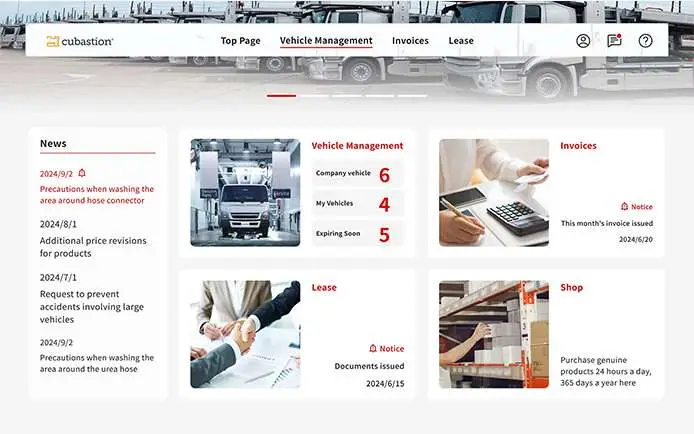
This Portal empowers vehicle managers to automate processes efficiently.When combined with custom Lightning Web Components, flows, triggers and other tools, it becomes even more powerful, enabling tailored UI, advanced logic,and a seamless user experience that feels more like an app than a form. It’s a great example of how declarative tools and custom development cancomplement each other to deliver both agility and sophistication.
Challenges
Fleet managers handling 20-70 commercial vehicles often juggle multipleresponsibilities, including:
1. Staying on top of service schedules without missing a beat, but with noautomated reminders, it’s easy for things to slip through the cracks.
2. No alerts when a vehicle’s Shaken (inspection) is about to expire or whenservice is due, forcing managers to rely on memory or manual tracking.
3. No real-time notifications for vehicle recall, leaving managers unaware ofsafety or compliance issues.
4. Lease documentation becomes a hassle, often scattered across emails orfolders, making it hard to retrieve during audits or renewals.
5. Estimating and analyzing service costs becomes a challenge, as there’s noconsolidated view of past expenses, leading to inefficiencies in budgetingand decision-making.
6. Vehicle managers must browse multiple third-party e-commerce sitestosource branded parts, resulting in wasted time, inconsistent pricing, and afragmented purchase experience.
7. Vehicle administrators need greater control at the organizational level, suchas configuring branches, assigning users, and linking vehicles, withoutdepending on IT support or managing it all through static spreadsheets.
Most of these tasks are scattered across emails, spreadsheets, and outdatedsystems-so we built a unified, user-friendly platform that empowers fleetmanagers and their admins to handle everything without calling five people oropening ten tabs.
Challenges to Solutions
Challenge 1: Missed Service Schedules
Fleet managers can easily view past service records and scheduleupcomingmaintenance using the service calendar, ensuring timely upkeep of each vehicle.

Challenge 2 and 3: Lack of Real-time alerts and Dashboard
The portal delivers real-time notifications for upcoming Shaken (inspection)expiries, vehicle recalls, news updates, and policy changes—keeping managersinformed and proactive.
Challenge 4: Scattered vehicle related documents
Integrated with third-party systems, the portal centralizes access tokeydocuments like lease agreements, invoices, and service files, making it easy tosearch and download files instantly.
Challenge 5: Difficulty in Estimating and Analyzing Service Costs
Fleet managers can review complete service histories along with associatedcosts and estimate upcoming maintenance expenses – all from asingle,organized interface.
Challenge 6: eShop Platform
The portal integrates e-commerce platforms for branded auto parts into oneunified interface – saving time and ensuring pricing consistency.
Challenge 7: Limited Administrative Control
Admins can independently configure branches, assign users, andmapvehicles—without relying on IT or using static spreadsheets – streamlining fleetcoordination across locations.
Salesforce Experience Cloud Architecture for Customer andSales Operations
This diagram shows how Salesforce Experience Cloud connects customersandsales reps with external systems (like SAP and Oracle) through an API Gateway.It enables vehicle management, notifications, and data sync between SiebelCRM and Salesforce using CRM APIs, fleet Mgmt tools, and invoice integrationand downloading functionality via Microsoft Azure.
It also shows how Fleet Management portal enables customers to purchaseparts directly from the SAP eCommerce tool.
Development Challenges & Resolutions
Despite Salesforce’s flexibility, below are some challenges andcountermeasures:
● Multi-language Support: Needed to support Japanese and English.Utilized Custom Labels and logic-based rendering but faced a limitationof5,000 custom labels. I implemented i18next.js for translation due to its lackof limitations.
● UI Limitations: Worked around Experience Cloud’s rigid templates usingLWC and custom CSS, as default page padding and design becamearoadblock.
● Heap Size Limits: Apex’s 6MB heap size limit posed challenges for imageuploads, requiring client-side compression and controlled file handling.
● Custom Solution: Since Apex cannot download files larger than 10MB, weimplemented our custom solution to achieve this. This functionsecurelyhandles large file downloads from the server.
● Client-Side Compression: A custom front-end compression utility was builtto reduce image sizes before uploading them to the contentmanagementsystem
● Query Limit on JSON Upload: While uploading large JSON payloads, weencountered query limit issues. This was resolved through targetedcodeoptimization and refined query handling logic.
● Sales Cloud lacked a unified customer view: Since CRM didn’t maintaingolden records, users couldn’t see all vehicles owned by a customer in oneplace. By implementing Data Cloud, we unified customer profiles and surfaced consolidated service and vehicle data on the portal, providing asingle, 360° view of each customer.
Adoption
Launching the portal was just the beginning, the real challenge wasdrivingconsistent user engagement beyond the first login. To address this,weimplemented a well-rounded adoption strategy focused on training, continuousfeedback, and active user listening.
● Pilot Users/Trading Technique: we onboarded a group of pilot users to evaluate portal usability, monitor real-world interaction, and provide early feedback on available services. Thishelpedus uncover minor UX issues, fine-tune the experience, and ensure the portal wasaccessible and intuitive before the full rollout.
● Dashboards : To understand which parts of the portal users preferred, we built reports anddashboards. We discovered that the vehicle tracking and e-invoice sectionsreceived the most clicks, guiding us to improve the most-used features.
● User Activity Tracking with Data Cloud : We integrated the portal with Salesforce Data Cloud to monitor userbehavior.The analytics revealed key usage patterns; admins primarily engaged with thebranch management tab, while general users frequently visited the maintenancepages. These insights played a crucial role in refining the user experienceandprioritizing future enhancements.
Why Choose Cubastion for Implementation?
The Cubastion Perspective: Cubastion ‘s implementation framework ensuresrapid ROI:
1. Needs Assessment: Audit existing workflows to identify automationopportunities.
2. Phased Rollout: Launch pilot portals for specific teams before enterprise-wide scaling.
3. Change Management: Train super-users and create governance policies forsustained adoption.
For a logistics client, we automated freight scheduling and invoicing, reducingmanual errors by 45%.
Final Thoughts
Salesforce Experience Cloud isn’t just a platform-it’s a catalyst for digital transformation. By bridging gaps between stakeholders, it drives efficiency,loyalty, and growth. Partner with Cubastion to unlock its full potential for yourorganization.